Overview
Two critical remote code execution (RCE) vulnerabilities in PHP core, CVE-2026-109618 and CVE-2026-109619, have been disclosed. PHP is a general-purpose scripting language widely used for web services. PHP-based web services, including WordPress, Drupal, Magento (Adobe Commerce), WooCommerce, and Shopware, are affected. Organizations running PHP must immediately identify their PHP assets and apply patches.
The two vulnerabilities are known as PHP2Shell. The PHP security team announced an out-of-band security release for October 21, 2026, at 14:00 UTC (23:00 KST). However, vulnerability details and screenshots of an exploit tool were leaked on October 20, ahead of the patch release.
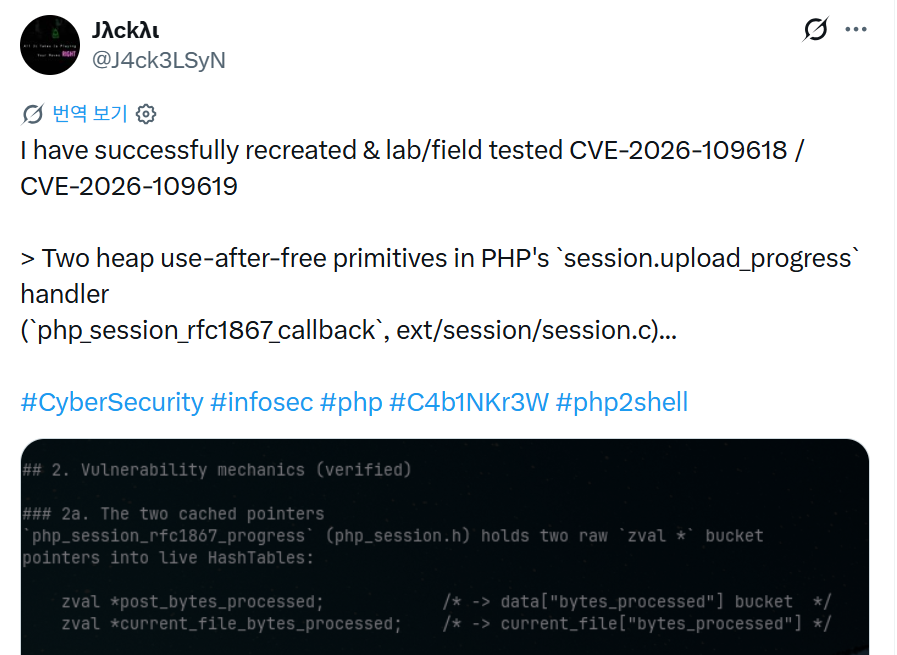
Figure 1. A post on X by security researcher J4ck3LSyN claiming to have reproduced the vulnerability. The researcher attributes the vulnerability to a heap use-after-free in the session.upload\_progress handler. PHP has not confirmed this finding.
Security firm watchTowr stated that it had reproduced CVE-2026-109618. The PHP security team assigned both vulnerabilities a CVSS v4.0 score of 9.2 (Critical). The score of 10.0 cited by some media outlets is not the official score.
As of October 21, 2026, there have been no reports of actual compromises or of either vulnerability being added to the CISA KEV catalog. However, exploit code could emerge quickly because vulnerability details were leaked ahead of the patch release. End-of-life (EOL) versions, including PHP 5.x, 7.x, 8.0, and 8.1, will not receive official patches.
| Item | Details |
|---|---|
| CVE | CVE-2026-109618, CVE-2026-109619 |
| Common name | PHP2Shell |
| Type | Heap use-after-free (CWE-416) → remote code execution (suspected) |
| CVSS | v4.0 9.2 (Critical), as assessed by the PHP security team |
| Authentication required | No (CERT-EU assessment) |
| Location | ext/session, session upload progress (session.upload_progress) handler (suspected) |
| Date of leak | 2026-10-20 |
| Patch release | 2026-10-21 14:00 UTC |
| Exploitation in the wild | Not reported (as of 2026-10-21) |
Affected Versions
According to public reports and the banner shown by the leaked exploit tool, all versions from PHP 5.4.0 onward are affected. PHP stated that it would identify the affected and fixed versions in the October 21 security release. Patches are expected to be available only for the currently supported 8.2, 8.3, 8.4, and 8.5 branches. The patched version numbers listed below are security researchers' predictions for the next point releases. Check these numbers against the official announcement on php.net before applying the updates.
| Branch | Vulnerable versions | Patched version | Notes |
|---|---|---|---|
| 8.5.x | 8.5.0–8.5.11 | 8.5.12 | Supported |
| 8.4.x | 8.4.0–8.4.26 | 8.4.27 | Supported |
| 8.3.x | 8.3.0–8.3.35 | 8.3.36 | Supported |
| 8.2.x | 8.2.0–8.2.34 | 8.2.35 | Security support ends on 2026-12-31 |
| 8.0.x, 8.1.x | All | None | EOL; upgrade to a newer branch required |
| 7.x | All | None | EOL; upgrade to a newer branch required |
| 5.4–5.6 | All | None | EOL; upgrade to a newer branch required |
Linux distributions such as RHEL, Ubuntu, Debian, and SUSE backport fixes to their own package versions. If you use distribution packages, consult your distribution's security advisories (CVE tracker) to determine their patch status, rather than relying on the upstream version numbers above. The official Docker php image is built from the source code published on php.net. Once a tag for the patched version is available, rebuild your images using that tag.
Vulnerability Analysis
PHP plans to identify the affected versions and publish technical details alongside the patches. The analysis below is provisional and draws on leaked material and publicly available analyses by security researchers.
Public analyses identify the upload progress tracking feature (session.upload_progress) in the PHP session extension (ext/session) as the suspected vulnerable component. This feature records upload progress in the user's session when a browser sends a file in multipart/form-data format. PHP parses the request body directly before application code runs. Therefore, if the suspected cause is correct, a request only needs to reach the web server to trigger the vulnerable code, regardless of which PHP scripts are deployed.
Root Cause (Suspected)
According to security researcher J4ck3LSyN's unconfirmed analysis, the php_session_rfc1867_callback function in ext/session/session.c caches raw zval pointers to progress values (post_bytes_processed, current_file_bytes_processed) in the session hash table. If the session data is decoded again during upload processing, the existing tree is freed by zval_ptr_dtor. The cached pointers remain unchanged and continue to reference freed memory, resulting in a heap use-after-free. An attacker can use crafted multipart requests to repopulate the freed memory region with attacker-controlled data (heap grooming), then hijack control flow through the zend_call_function path to invoke arbitrary functions such as system(). Of the two vulnerabilities, one is suspected to reside in the upload progress handler and the other in the multipart parser.
If the suspected cause is correct, all the configuration values required to trigger the vulnerabilities are PHP defaults.
| Setting | Default value | Description |
|---|---|---|
session.upload_progress.enabled | 1 (On) | Enables upload progress tracking |
session.upload_progress.name | PHP_SESSION_UPLOAD_PROGRESS | POST field name that initiates tracking |
session.upload_progress.freq | 1% | Progress update frequency |
session.upload_progress.min_freq | 1 | Minimum update interval (seconds) |
If the suspected cause is correct, all PHP web servers running with default settings are exposed to attack. An unauthenticated attacker can execute the vulnerable code by sending a multipart POST request containing the PHP_SESSION_UPLOAD_PROGRESS field, even to a path without a file upload form.
Impact of Successful Exploitation
- Arbitrary command execution: Execute system commands with the privileges of PHP-FPM or the web server (www-data, apache, nginx, etc.).
- Web shell installation: Write a PHP web shell to the web root to establish persistent access.
- Data exfiltration: Steal configuration files containing database connection details (wp-config.php, .env, env.php, etc.), session data, and customer information.
- Payment data theft: Inject a payment card skimmer (Magecart) into an e-commerce site's checkout page.
- Internal network attacks: Use the web server as a foothold for lateral movement to internal systems such as database servers.
- Privilege escalation: Chain the exploit with kernel or local vulnerabilities to gain root privileges.
Detection Guidance
1. Identify Vulnerable Assets
On every web server in use, check the PHP version and whether upload progress tracking is enabled.
# Check the PHP version
php -v

# Check whether upload progress tracking is enabled (1 or On means the suspected vulnerable code path is enabled)
php -i | grep -i "session.upload_progress"

# Check distribution package versions
dpkg -l | grep php          # Debian/Ubuntu
rpm -qa | grep php          # RHEL/Rocky/Alma
2. Review Web Access Logs
According to public analyses, the vulnerability is triggered by multipart POST requests containing the PHP_SESSION_UPLOAD_PROGRESS field. Check for multipart POST requests to URLs without file upload functionality or to static resource paths, particularly repeated requests from the same source IP address within a short period. Because access logs do not record request bodies, supplement them with request body logging at the WAF or reverse proxy, or with packet captures.
# Logs to check: /var/log/nginx/access.log, /var/log/apache2/access.log, etc.
# Identify multipart POST requests to paths without upload functionality
# (The following examples illustrate the format and are not confirmed attack logs)
"POST /index.php HTTP/1.1" 500 ... "python-requests/2.x"
"POST /wp-login.php HTTP/1.1" 502 ... "curl/8.x"
3. Review PHP-FPM / Web Server Error Logs
When a heap UAF exploit fails to manipulate the memory layout successfully, the worker process crashes. Logs showing segmentation faults or worker restarts at an unusual frequency may indicate attempted exploitation.
# Logs to check: /var/log/php-fpm/error.log, /var/log/php8.x-fpm.log
# (The following examples illustrate the format)
WARNING: [pool www] child 12345 exited on signal 11 (SIGSEGV - core dumped) after 3.214 seconds from start
WARNING: [pool www] child 12346 exited on signal 6 (SIGABRT) after 0.812 seconds from start

# Log to check: /var/log/nginx/error.log
upstream prematurely closed connection while reading response header from upstream
4. Check for Anomalous Processes
Check for evidence that PHP workers have launched shells or system commands as child processes. During normal operation, php-fpm workers do not launch shells.
# Check child processes of php-fpm or apache workers
ps -ef --forest | grep -A3 -E "php-fpm|apache2|httpd"

# Suspicious pattern: sh, bash, curl, wget, nc, python, or perl processes running under php-fpm
5. Check for Web Shells and File Tampering
Check for recently created or modified PHP files in the web root and in upload, cache, and temporary directories.
# PHP files created or modified within the last 7 days
find /var/www -type f -name "*.php" -mtime -7 -ls

# PHP files created in writable directories (uploads, cache, tmp)
find /var/www /tmp /var/tmp -type f -name "*.php" -newermt "2026-10-20"

# Search for web shell signatures
grep -rlE "eval\(base64_decode|system\(\$_(GET|POST|REQUEST)|passthru\(|shell_exec\(" /var/www
6. Check for Anomalous Outbound Communications
Review outbound connections from the web server, paying particular attention to reverse shells or C2 communications initiated by php-fpm or apache processes.
# Check outbound connections from php-fpm / web server processes
ss -tnp | grep -E "php-fpm|apache|httpd" | grep -v ":80 \|:443 "

# In firewall and proxy logs, check outbound connections from web servers for unusual ports (4444, 1337, etc.) and unregistered destinations
7. Perform Additional Checks on E-Commerce Sites
If your organization runs Magento, WooCommerce, or Shopware, also check for skimming scripts injected into checkout pages and administrator accounts created under unusual circumstances. In previous cases involving exploitation of PHP or platform vulnerabilities, Magecart-associated threat actors have begun mass exploitation within days.
Recommended Actions
1. Apply the Security Release Immediately
Identify all PHP versions in use and update to a fixed version in a supported branch (8.2 or later) as soon as the official PHP security release becomes available. For distribution packages, install the distribution's backported updates. Rebuild Docker images using the tag for the patched version. After updating, use php -v to verify that the version has actually changed on every host, and confirm that PHP-FPM and the web server have been restarted.
2. Apply Temporary Mitigations Before Patching
Disable upload progress tracking until the patches are applied. File uploads will continue to work, but upload progress will no longer be displayed. However, this measure has been reported to block only one of the two suspected paths: the path through the upload progress handler. It is not a substitute for patching.
# php.ini (apply server-wide, then restart PHP-FPM or Apache)
session.upload_progress.enabled = 0

# .user.ini (PHP-FPM/CGI; takes effect after the default user_ini.cache_ttl of 300 seconds)
session.upload_progress.enabled = 0

# .htaccess (mod_php; requires AllowOverride Options)
php_flag session.upload_progress.enabled off
3. Block Requests at the WAF or Reverse Proxy
Use the WAF or reverse proxy to block multipart requests containing the PHP_SESSION_UPLOAD_PROGRESS field name, or block multipart POST requests to paths without upload functionality. Before applying these rules, check whether legitimate services use progress tracking.
4. Address End-of-Life Versions
End-of-life versions, including PHP 8.1 and earlier, will not receive official patches. Apply the temporary mitigations immediately and establish a schedule for upgrading to a supported branch. If upgrading is difficult, ask your hosting provider or distribution vendor whether they offer backported patches.
5. Check for Compromise
Because vulnerability details were leaked ahead of the patch release, exploit code could emerge quickly. Regardless of whether patches have been applied, you must follow the detection guidance above to review PHP-FPM crash logs and check for web shells and anomalous outbound communications.
References
- PHP Security Team Announcement: Upcoming Critical PHP Security Release
- watchTowr, PHP Remote Code Execution FAQ (CVE-2026-109618 & CVE-2026-109619)
- Huntress, Rapid Response: php2shell, Leaked Critical PHP Vulnerabilities
- Sansec, Critical PHP RCE: CVE-2026-109618 and CVE-2026-109619
- SecurityWeek, PHP2Shell: Mass Exploitation Looms for Leaked Critical PHP Flaws
- Phoenix Security, PHP Core RCE (CVE-2026-109618, CVE-2026-109619)
- Mallory, PHP's Critical RCE Fixes Skip 884,000 Internet-Facing Hosts
- lilting.ch, Disabling session.upload\_progress Before the php2shell Patch Lands
- J4ck3LSyN, php-up-2026